AI trading app: build and test rules with AI
AI trading means using artificial intelligence to help with trading decisions. On Tactfolio, an AI assistant helps you write investing rules, test them on past prices, and save them. You read every rule, and you decide what runs.
- Describe an idea in a sentence. Your AI assistant builds it as a strategy in your account.
- Every strategy is a set of rules you can read. Nothing is hidden.
- The assistant can test up to 12 versions of an idea, then check the winner on years it did not see.
- The assistant can’t trade or publish. Only you can start a strategy.
- Stock strategies use daily prices of US stocks and ETFs, are long only, and trade through Alpaca only. Hyperliquid crypto perps are backtest and paper or testnet only.
Open the builderFree while we build. Look around without an account.
What is AI trading?#
AI trading is any kind of trading where software helps decide what to buy or sell. Some tools read the news. Some try to guess tomorrow’s price. Others, like Tactfolio, help you write and test your own rules.
The hard part is trust. If a tool can’t show you why it bought something, you can’t tell skill from luck. The CFTC, a US market regulator, warns that AI won’t turn trading bots into money machines. The SEC warns that scammers often use AI claims to sell fake investment schemes.
So we built Tactfolio’s AI the other way around. The AI writes rules. You can read the rules, test them, and throw them away.
How AI trading works on Tactfolio#
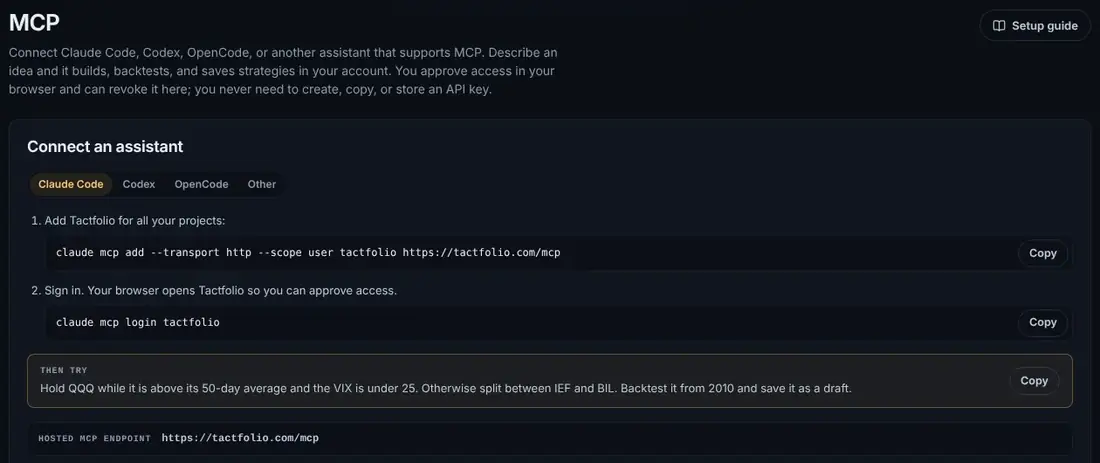
Tactfolio connects to AI assistants through MCP. MCP, short for Model Context Protocol, is an open standard that lets an assistant use tools in other apps.
- Connect your assistant. Add
https://tactfolio.com/mcpto Claude, ChatGPT, Claude Code, Codex, Cursor, or another assistant that supports remote MCP. You approve access in your browser. There is no API key to copy. - Describe a rule. For example: “Hold QQQ while it is above its 50-day average and the VIX is under 25. Otherwise split between IEF and BIL. Backtest it from 2010 and save it as a draft.”
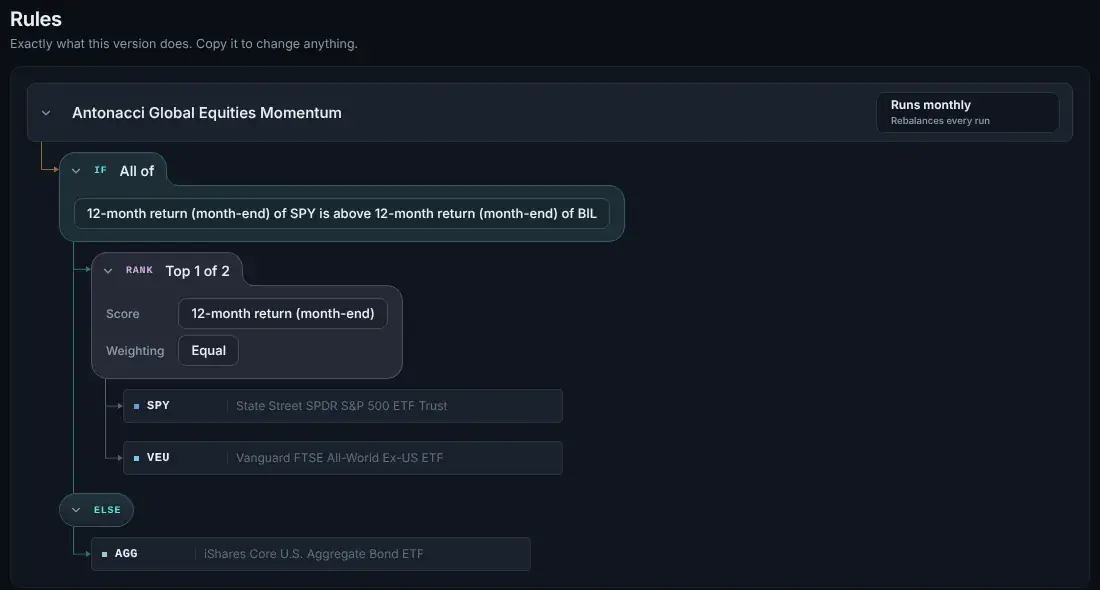
- Read what it built. The assistant saves a draft. Open it in the builder to see the rules as a tree, with the backtest beside it.
- Run it if you want to. You can start it on paper or in your own Alpaca account. That step is yours. The assistant can’t take it.
The setup guide has the exact steps for each assistant.
What your AI assistant can and can’t do#
Your assistant works with the same blocks and the same backtests as you do. It works faster.
| Your assistant can | Your assistant can’t |
|---|---|
| Build a strategy from your description | Place trades or start trading |
| Run backtests and compare up to 12 versions | Publish a strategy |
| Find tickers and check their price history | Change your account settings |
| Save drafts as new revisions you can undo | Hold anything your rules don’t name |
Why readable rules matter more with AI#
An AI can try 50 versions of a rule while you try one. That makes it very good at finding a rule that fit the past by luck. This problem is called overfitting: a rule that matches old prices well but fails on new ones.
Tactfolio pushes back in three ways:
- The
backtest_variantstool tunes a rule on older years. Then it checks the winner once on recent years it has not seen. - Every backtest also shows a next-day-open line and a “Reality checks” table with higher costs. A rule that only works in a perfect world shows up fast.
- When you publish a strategy, its page draws an “Out of sample” line on the day you published. Everything after that line is a real test.
Why past results mislead explains the traps in more detail. If you want to see what a finished strategy looks like, open a classic strategy such as dual momentum.
What are the best AI trading platforms?#
The best AI trading platform is one where you can see and test what the AI built. These are the main tools that use AI to build or test strategies, as checked on October 16, 2026:
| Platform | What its AI does | Where trades go |
|---|---|---|
| Tactfolio | Your own assistant, such as Claude Code or Codex, builds and backtests rules through MCP | Your own Alpaca account, run by fixed rules |
| Composer | “Trade with AI” builds strategies from plain English, using models from Anthropic and OpenAI | Your Composer brokerage account |
| QuantConnect | An agent called Mia writes trading code, runs backtests and fixes errors | About 20 brokers |
| TrendSpider | Sidekick builds and tests chart-based strategies | Many brokers through webhooks |
| ORATS | An agent called Otto helps with options research | Orders you send to your own broker |
Be careful with any app that says its AI picks winning stocks for you. A joint alert from the SEC, NASAA and FINRA warns about claims that AI can guarantee big returns. Our guide can ChatGPT or Claude backtest a trading strategy? explains how to use AI for testing without fooling yourself. For a full list of rule-based platforms, see the best algo trading platforms.
What Tactfolio does and does not do#
| Tactfolio does | Tactfolio does not |
|---|---|
| Let an AI assistant build, test, and save strategies in your account | Pick investments for you or give advice |
| Backtest rules on daily prices of US-listed stocks and ETFs | Trade options, forex, or CFDs |
| Backtest Hyperliquid crypto perps, then run them on paper or testnet | Trade crypto with real money |
| Run a strategy on paper, or in your own Alpaca account | Work with any broker other than Alpaca |
| Hold leveraged and inverse ETFs like any other fund | Sell short or borrow on margin |
| Check stock rules once a trading day, near the close | Trade stocks during the day, or trade at high speed |
Try it on Tactfolio#
Open the builder and look at the four starter patterns. No account is needed to look. When you want your assistant to help, follow the MCP setup steps. Building with AI is the same as building by hand, so you can also backtest a strategy yourself first.
Open the builderFree while we build. Look around without an account.
Keep learning#
- Algorithmic trading explained: how written rules turn into trades.
- Trading signals: what a signal is, and how to test one before you trust it.
- Backtesting explained: why every rule, from you or from an AI, needs a test on past prices.
- Backtest with ChatGPT or Claude: three ways to use an AI assistant for backtesting, and which one to trust.
- Tactfolio vs Composer: how two rule builders with AI help differ.
- Monte Carlo simulator: a free tool that shows a range of possible futures for a plan.
Common questions#
Is AI trading legit?#
AI can help with research, but it can’t promise profits. Be careful with any app that promises sure or very high returns. The SEC warns that scams often use AI claims. On Tactfolio, the AI only helps you build rules, and every result is a backtest you can check.
Can AI trade stocks for me?#
Not on Tactfolio. Your AI assistant can build and test a strategy, but it can’t trade. You start trading yourself, on paper or in your own Alpaca account. From then on, the strategy follows its own rules.
Which AI assistants work with Tactfolio?#
Any assistant that supports remote MCP servers with OAuth sign-in. The MCP guide has steps for nine assistants, with one-click buttons for Claude, Cursor, and VS Code. We tested setup in Claude Code, Codex, and OpenCode. For Claude, ChatGPT, Cursor, VS Code, and Gemini CLI, we checked that sign-in reaches Tactfolio.
Do I need to know how to code?#
No. You can describe an idea in plain words to your assistant. You can also build it by hand in the visual builder. Connecting an assistant takes one or two commands that you copy from the MCP page.
What is a good AI trading app for beginners?#
No single app is right for everyone. A good one for a beginner shows its rules, tests on real prices with costs, and lets you practice with pretend money first. Tactfolio does all three.
Is Tactfolio free?#
Yes. Everything is free while we build. Pricing comes with live trading.
Sources
- Customer Advisory: AI Won’t Turn Trading Bots into Money Machines, U.S. Commodity Futures Trading Commission, accessed October 16, 2026
- Artificial Intelligence (AI) and Investment Fraud: Investor Alert, U.S. Securities and Exchange Commission, Investor.gov, accessed October 16, 2026
- What is the Model Context Protocol (MCP)?, Model Context Protocol, accessed October 16, 2026